The ideal number of internal links per page is 3 to 10 depending on content length stay with me to learn how to use them effectively.
In an SEO strategy, links play a crucial role, and they should be created and organised following your website’s information architecture. This video will explore internal linking in SEO and answer the big question: how many internal links should you use per page?
We’ll begin by breaking down the basic concepts of SEO linking (internal and external links). Then, we’ll move on to more intermediate practices like the ideal number of links per page and the best ways to manage internal linking. Finally, we’ll dive into more advanced topics such as link strategy and how it ties in with your site’s structure.
We’ll also clear up the difference between internal and external links in SEO, including what link building means and the topic of buying backlinks, so you’ll get the full picture.
Let’s get move on.
What is an internal link?
An internal link is simply a link that takes you from one page to another within the same website. It’s a hyperlink connecting two pages on your own site. For example, if one of your blog posts links to another article on your domain, that’s an internal link. These links help users move around your site more easily and help search engines understand how your content is structured.
Internal links vs external links
External links, or backlinks, are different from internal ones. They go to or come from other domains. For example, a link on your page that points to another company’s site is an external link. Likewise, if another site links to yours, that’s also a backlink.
Internal links keep users within your site. They improve navigation and help spread authority (sometimes called PageRank) across your pages. External links, on the other hand, connect your site to other websites. These are important for building credibility and boosting off-page SEO.
Both internal and external links are part of SEO linking. Link building usually refers to getting external links (backlinks), but a strong SEO strategy starts with a clear internal linking structure on your own site.
Why is internal linking SEO important?
Internal linking SEO plays a key role in helping your website perform better in search results. There are a few main reasons why it’s so important:
It helps with indexing. Search engines use internal linking SEO to discover and index new pages. If a page has no internal links pointing to it, it becomes an orphan page and may not appear in Google’s index.
It transfers authority. With internal linking SEO, authority (also known as link equity or PageRank) flows from one page to another. This helps strengthen key pages when they receive links from other relevant areas on your site.
It adds context. Using clear and descriptive anchor text, internal linking SEO tells Google what the linked page is about. This improves how well your pages are understood and ranked.
It improves user experience. When internal links are used properly, people can easily find related content. This keeps them on your site longer and reduces bounce rate.
In short, internal linking SEO supports both user navigation and your visibility in search engines. It’s one of the simplest but most powerful tools in your SEO strategy.
Information Architecture and Internal Linking SEO
An effective internal linking SEO strategy is built around the information architecture of your website. This means how your pages are organised into categories, subcategories and content pages. Here we will explain strategies to set up the internal linking structure for your site.
Hierarchical structure (three-level model)
Many people imagine information architecture as a pyramid, but there is actually a simpler and more organised way to do it for free, using the three-level model.
This exercise is tricky and should be done after you pick the right SEO keywords and even before you open any CMS like WordPress or whichever you prefer. The challenge is that you need to imagine how your site map will look before setting anything up. The key is to organise all your selected keywords in a clear and logical way, using no more than three levels, especially for small projects.
At level one, you place your homepage and any other main sections of your website that will appear in your site menu. For example, in the case of Rojas Creator, it would look like this.
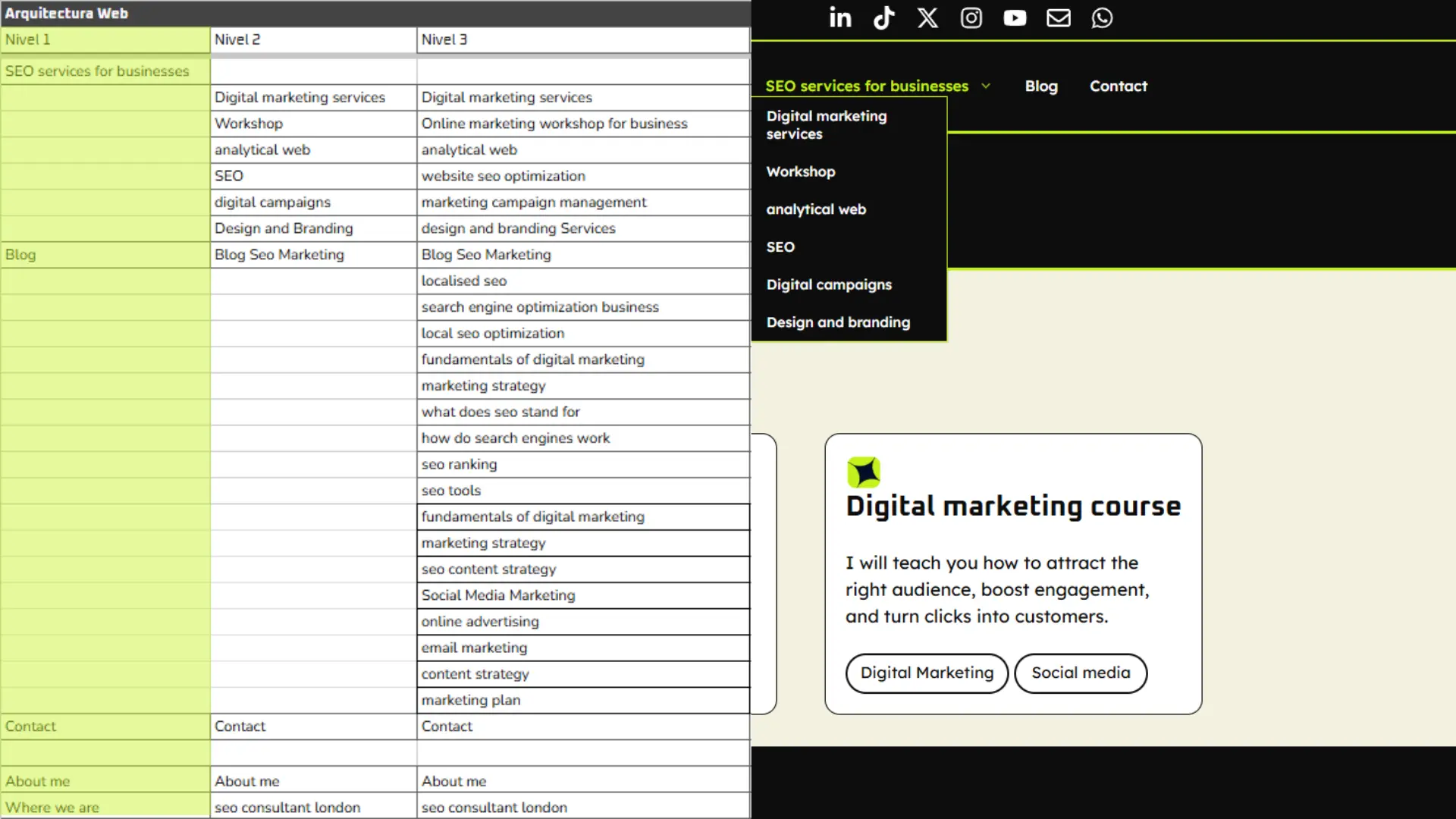
Right next to it, you will have the second-level column, where you list your main services or categories.
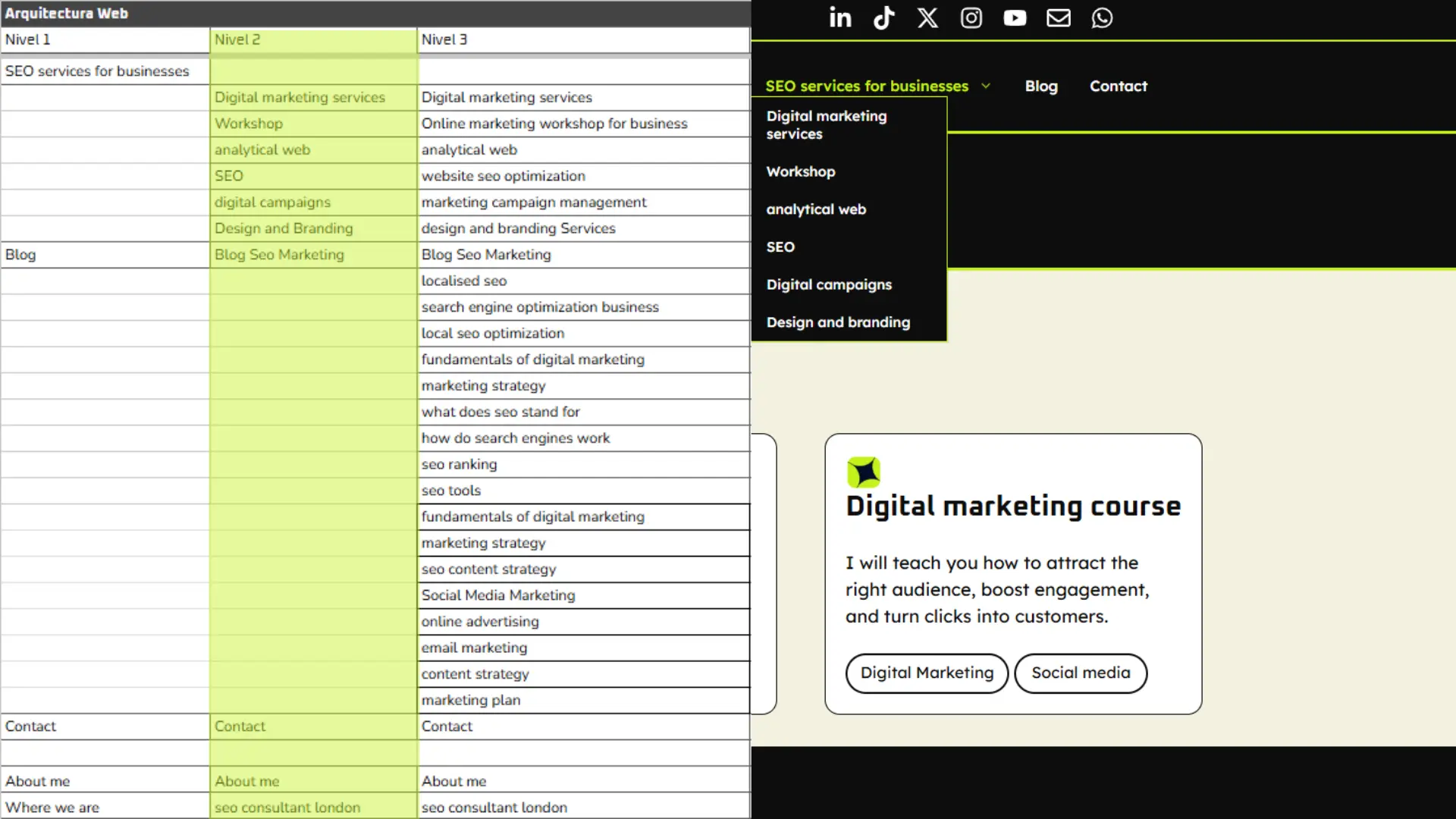
At level three, you add the subcategories and articles. Each level must link logically to the next. This ensures that from the homepage you can reach any page with no more than three clicks.
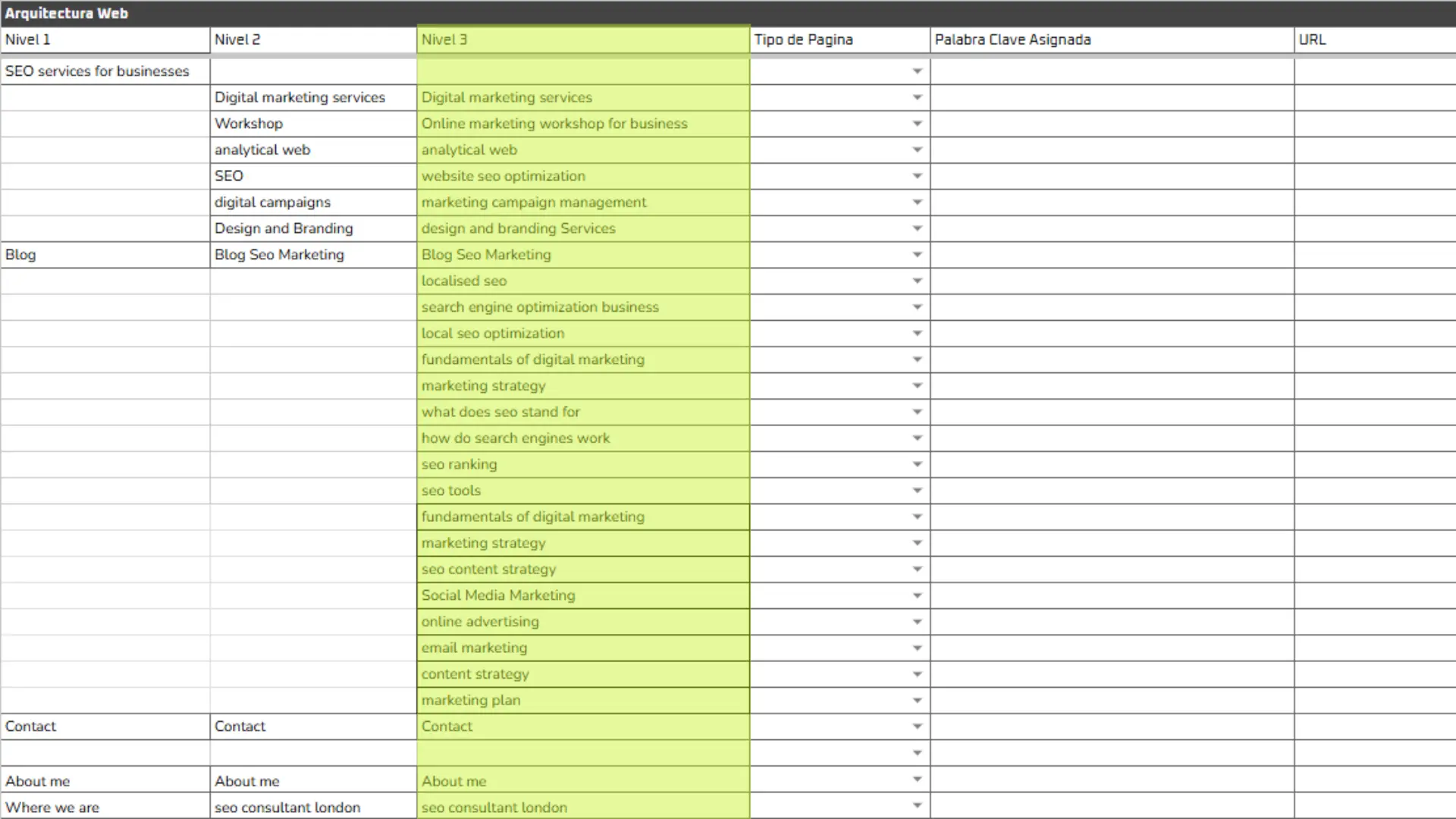
A clear structure makes it easier for Google to crawl your site, improves navigation for users, and creates a strong internal linking SEO setup.
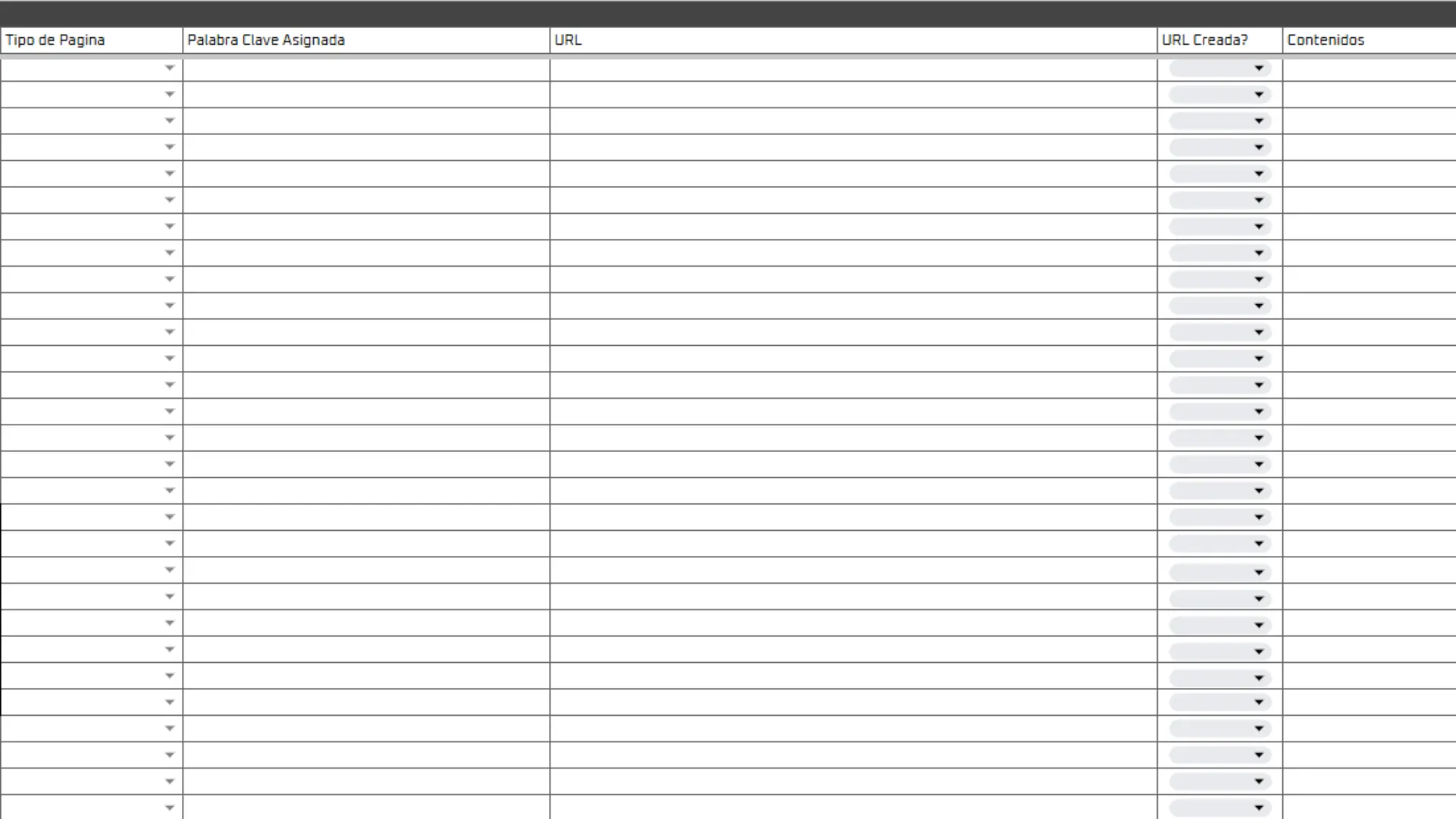
This method is very practical because it not only gives you a real and usable structure for your website, but with the extra information in the next columns, like the keyword assigned to each page and space to upload your content drafts, you can also keep a full backup of your site’s content using only Google Docs and Google Sheets.
You can get access to this template by joining one of my SEO classes where I review your project, set you homework and share resources like this one.
Within this three-level system, you can also develop silo content clusters. Another internal linking SEO strategy is to group your content by themes.
For example, you create a hub or pillar page of around 5000 words about a broad topic, which then links out to several more specific pages of about 800 to 1000 words each.
These smaller pages also link back to the pillar. This hub and spoke approach keeps related pages strongly connected, boosting their thematic relevance in the eyes of Google.
Remember that links in menus, sidebars and footers are also part of your internal linking SEO structure. Make sure your menu highlights the key sections of your website and that all important pages are linked from some menu or structural section.
Just as we organised in level one, where all our main pages link directly to the main domain. This helps answer how to plan your internal linking SEO strategy: by analysing your site’s hierarchy and making sure everything is properly interconnected.
Best Practices for Internal Linking SEO
Now that we understand the importance of internal links and how to structure them, let’s look at the best practices for internal linking SEO to improve your site’s performance.
Use clear anchor text
Always use anchor text that is descriptive and relevant. Avoid using phrases like “click here.” Instead, use keywords that tell the reader and Google what the linked page is about. This makes the link more helpful and meaningful.
Focus on relevance and context
Add internal links where they make sense for the reader. Link to related content only when it’s useful. For example, if you mention a topic that you’ve already written about in another post, that’s a great place to add an internal link.
Don’t overload the page with links
Avoid placing too many links close together or adding one in every sentence. Links should feel natural in the text. Too many can distract or confuse the reader. Remember: less is more, as long as the links you do add are genuinely useful.
Avoid orphan pages
Make sure every important page on your site is linked from at least one other internal page. If you have valuable content sitting alone, link to it from menus, related articles or even old blog posts. This improves crawlability and strengthens your internal linking SEO structure.
Keep building internal links regularly
Internal linking is not a one-time task. Every time you publish new content, think about what older pages can link to it. Also, make sure your new content includes links back to relevant older pages. This kind of internal link building keeps your website well connected as it grows.
Balance your link distribution
Focus on linking to key pages that bring SEO value, like your main service pages or content pillars. Link to these from other related posts when it fits naturally. But don’t try to link everything to everything. Stick to a logical and topic-based structure.
Let’s quickly go over the key points.
A strong internal linking SEO strategy starts with understanding what internal links are and why they matter. You need to design your site structure based on good information architecture and apply internal linking best practices on every page.
When it comes to how many internal links you should use per page, remember that quality matters more than quantity. Add as many links as are genuinely useful and logical for the user, while keeping the page clean and easy to read.
Good internal linking improves navigation, spreads SEO authority across your site and sets you up to get even more value from any external backlinks you earn.
In short, mastering internal linking SEO gives you real control over your on-page SEO. It boosts your site’s chances of ranking well in a natural and sustainable way.
Apply these tips and you will start seeing real improvements in your website’s visibility.